
Hostinger vs Cloudways 2026: Budget Hosting or Managed Cloud?

Key takeaways
- Match Hostinger VPS or cloud to Cloudways Flexible—not the cheapest Hostinger shared intro alone.
- Hostinger wins when monthly price leads and you accept more DIY on VPS.
- Cloudways Flexible wins when you want a managed cloud layer with provider choice and less server chore work.
- Model Hostinger intro vs renew prices; Cloudways usually needs separate email.
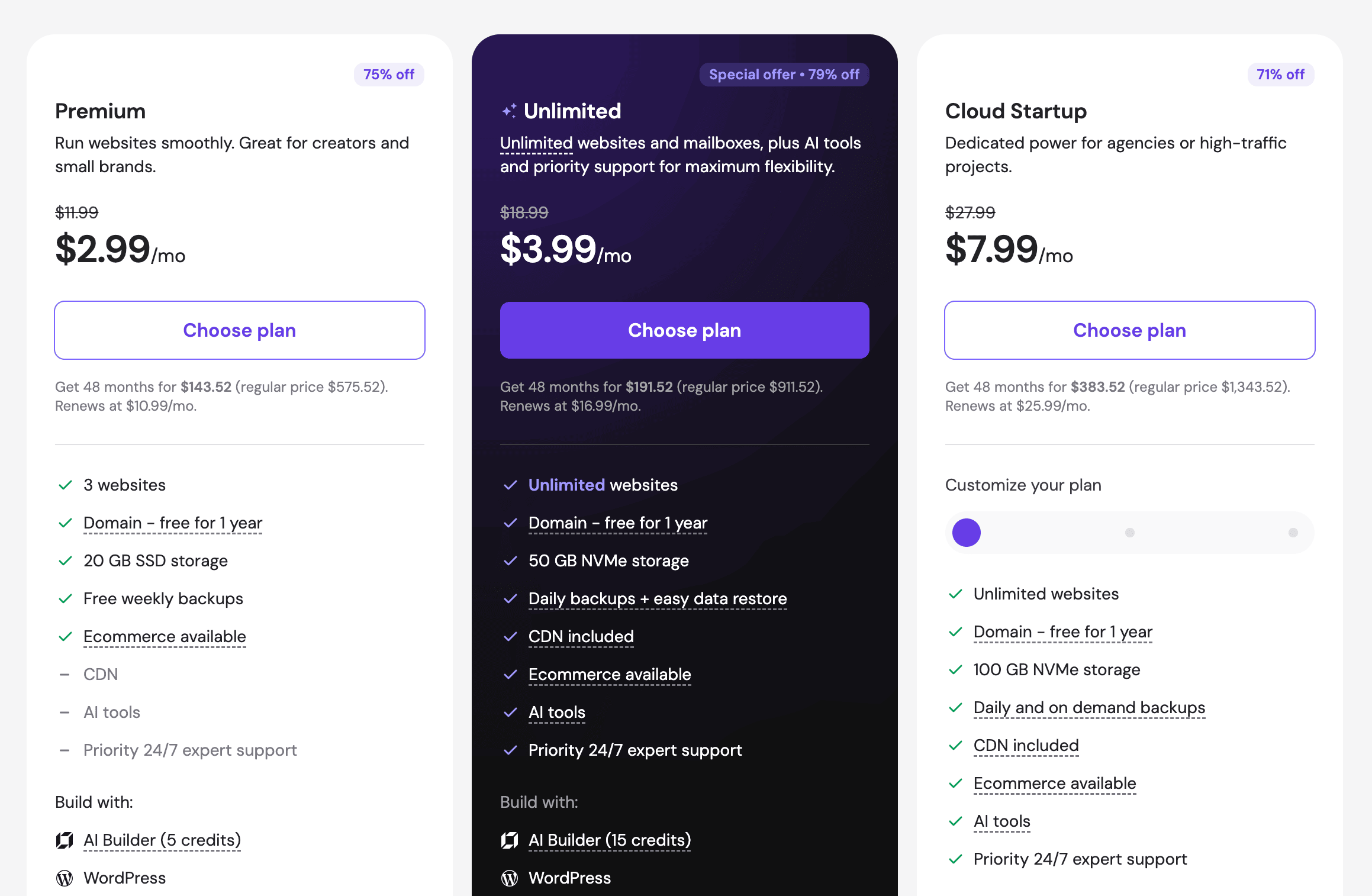
Hostinger sells shared, Cloud Startup, and KVM. Those are three bills. KVM 2 often about $8.79 intro → $14.99 renew as of November 2026. Cloudways Flexible’s small DigitalOcean class is about $28/mo—managed, month to month. Put Hostinger VPS or cloud next to Flexible, not the cheapest shared intro.
| Job | Lean Hostinger | Lean Cloudways Flexible | Neither |
|---|---|---|---|
| List price leads; year two already modeled | Shared or Cloud Startup after renew (~$11.99 Premium / ~$26 Cloud class) | You expected Flexible-class managed cloud | Kinsta if you wanted premium WP polish |
| DIY KVM; you’ll run the OS | KVM 2 ~$8.79 intro → ~$14.99 renew | You wanted a panel without sysadmin | Vultr/RackNerd if region or hourly matters more |
| Packing many apps; less SSH | hPanel on shared/cloud | Flexible ~$28/mo DO small + mailbox | Premium WP if the flagship needs that polish |
| Need email that feels bundled | Hostinger shared often feels all-in-one | Cloudways usually has no bundled email | Third-party mailbox; don’t mix KVM into this row |
What you’re actually comparing
Cloudways
Cloudways sells managed cloud hosting. On Flexible, you choose an underlying cloud and pay like a managed server (hourly or monthly, vertical resize). Autonomous is a separate autoscaling WordPress line—only relevant here if your Hostinger alternative search is really “hands-off WP scale.” Product-line depth is in the Cloudways review.
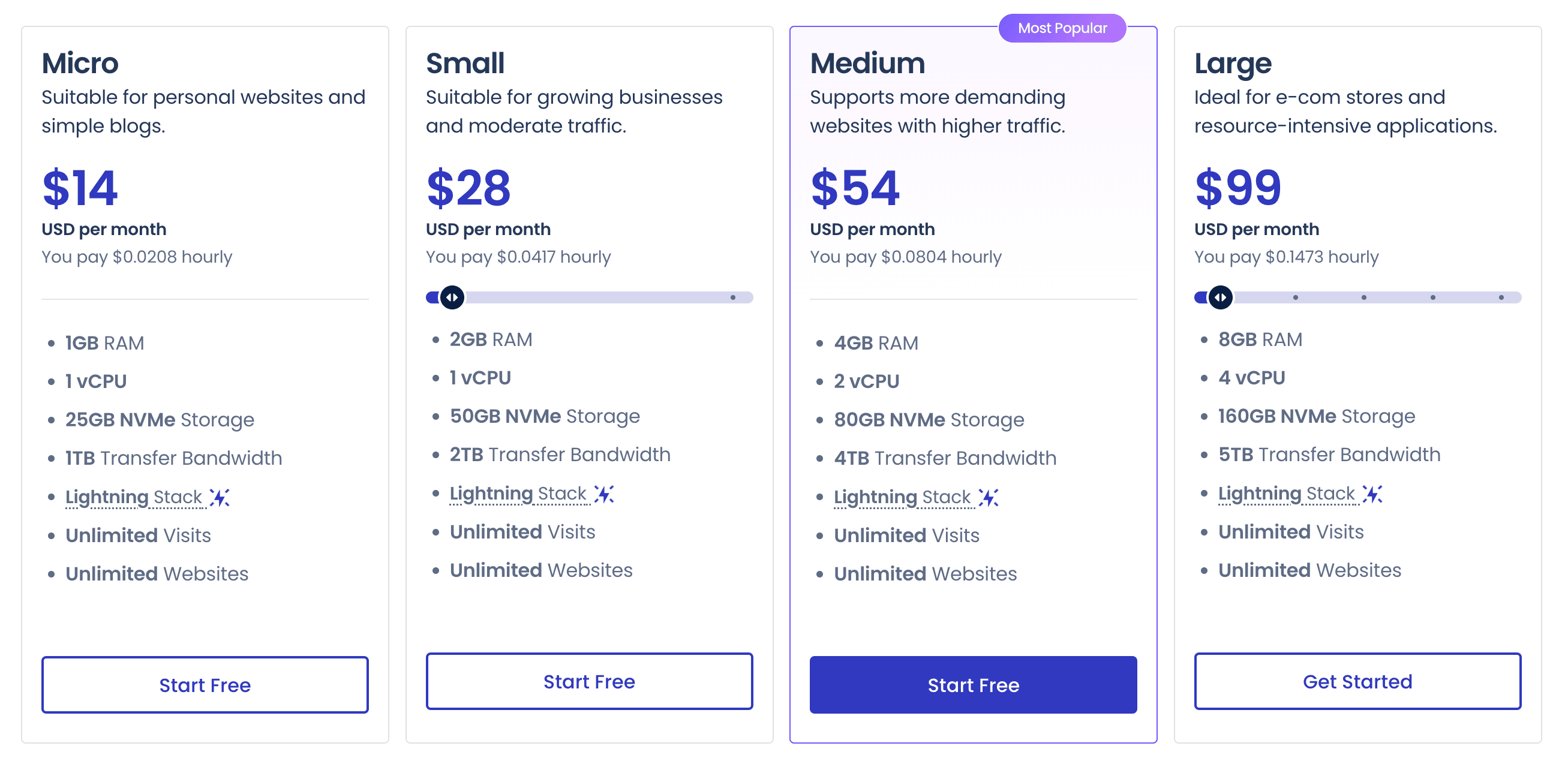
As of November 2026, entry DigitalOcean-class Flexible often lands around the $28/mo class for a small size—confirm live on Cloudways pricing. You’re paying for the managed layer, not bare DIY.
Hostinger
Hostinger is a budget shared / cloud / VPS lineup. Marketing leans hard on intro discounts. Their VPS products are the honest compare to Flexible: cheaper capacity, but closer to you manage more of the stack than Cloudways’ managed panel. Shared plans are fine for light sites; they’re a weak one-to-one compare against Flexible. The KVM line—root, intro vs renew, who should skip it—is the Hostinger VPS review.
I don’t treat Hostinger as “Cloudways but cheaper.” Different buyer, different amount of sysadmin.
What Cloudways is (and isn’t): Cloudways is a management layer on cloud VMs—you’re not buying a classic shared “website host” product. Flexible sizes a server; you attach apps. That framing matters when Hostinger marketing feels like all-in-one hosting and Cloudways feels like “a server with a panel.”
Beginner vs growth path
Hostinger usually wins ease of first launch: shared or entry VPS plans, domain/SSL/CDN-style inclusions on many plans, email that feels bundled, and a UI aimed at people who don’t want to pick DigitalOcean vs Vultr on day one. That friendliness is the product.
Cloudways Flexible wins when you’ve outgrown “cheap and bundled” and care about provider choice, resize, and packing many apps on one server—with the tradeoff that email and some security extras are often add-ons or separate products. Upsells (mailbox, malware tooling, backup storage) are normal; budget them so Flexible doesn’t look artificially cheap next to an all-in-one Hostinger plan.
Switching rule of thumb: stay on Hostinger while price + inclusions still cover the job. Move toward Flexible when shared/VPS DIY pain (limits, maintenance, or messy multi-site math) costs more than the managed-cloud bill—and you’ve already compared Hostinger VPS ↔ Flexible, not shared intro ↔ mid Flexible.
Pricing and billing (dated)
| Dimension | Cloudways Flexible | Hostinger (typical) |
|---|---|---|
| How you’re billed | Per-server / cloud size | Shared, cloud, or VPS plans |
| Where bills surprise | Spec sheet and add-ons (e.g. offsite backup storage) | Intro vs renew on sale plans |
| Day-to-day work | Managed panel on chosen cloud | Shared simplicity or more DIY on VPS |
| Usually not included | Often part of the “hosting feels complete” story | |
| Inclusions | Panel + cloud size; email/security often extra | Domain/SSL/CDN-style bundles common on sale plans |
| Resource math | Pay for VM size; scale by resize | Plan quotas; VPS closer to DIY capacity |
For current Hostinger VPS sale framing (intro vs renew examples), see Hostinger deals and re-check hostinger.com live—don’t trust a screenshot forever.
What you’d actually pay (rough monthly math)
Illustrative monthly math as of November 2026—not a quote. Re-check Hostinger live and Cloudways pricing.
| Plan pair | Early monthly class | Steady / renew class | Day-to-day work |
|---|---|---|---|
| Hostinger Premium shared | ~$2.99 intro | ~$11.99 renew | Low — not a like-for-like Flexible match |
| Hostinger Cloud Startup | ~$7.99 intro | ~$25.99 renew | Managed cloud category — fairer than Premium alone |
| Hostinger KVM 2 VPS | ~$8.79 intro | ~$14.99 renew | DIY stack (root / panel you add) |
| Cloudways Flexible DO small (~2GB) | ~$28 | ~$28 + mailbox + backup GB | Managed apps on a sized VM |
| Cloudways Flexible mid (~8GB) | ~$88 | ~$88 + add-ons | Multi-app / heavier PHP category |
Who manages what
| Job | Hostinger KVM | Cloudways Flexible |
|---|---|---|
| Pick VM size / provider | You (Hostinger plan) | You pick cloud + size in panel |
| OS / stack patching | Mostly you | Managed layer handles more day-to-day |
| WordPress app workflow | You (or a panel you install) | Apps attach to the server in-panel |
| Often easier on Hostinger web plans; VPS varies | Usually separate mailbox | |
| Domain / SSL / CDN-style bundles | Common on sale web plans | Not the same “all-in-one” story |
How I’d read it: Premium shared intro will always look cheapest and still be the wrong Flexible compare. Put Cloud Startup or KVM renew next to Flexible + mail—same rows on the first-term vs renewal table. If KVM’s renew is fine but you’re tired of being the sysadmin, Flexible’s steadier managed bill is the growth path—not Hostinger with a Cloudways nameplate.
Use profiles (not a speed contest)
| Profile | Lean Hostinger | Lean Cloudways Flexible |
|---|---|---|
| First site / brochure | Shared or cheap cloud if renew math OK | Overkill unless you already want managed cloud |
| Growing Woo / heavier PHP | Only if VPS skill + renew OK | Stronger when managed resize beats DIY VPS chores |
| Agency multi-site on one bill | Possible on VPS DIY | Clearer per-server multi-app story |
| “Just make email work” | Usually easier | Budget Google Workspace / similar day one |
Support / performance expectations: Hostinger buyers often optimize for ticket simplicity and price; Cloudways buyers should expect a managed-cloud workflow (apps on a server) and judge support on staging, migrate, and resize jobs. If WooCommerce is the job, size the like-for-like plan pair first.
Day-to-day on Flexible (what I actually do)
Day-to-day on stacks I’ve run is less than raw KVM and more than Hostinger shared: size the server, attach the app, clone before a risky update, purge cache when the front end looks stuck after a deploy. That is the “managed” homework.
Hostinger → Cloudways (short checklist)
- Like-for-like product — migrate from Hostinger VPS/cloud, not from the cheapest shared intro, if Flexible is the destination.
- Mailbox — stand up mail before DNS if you’re leaving bundled Hostinger mail.
- Lower DNS TTL; migrate to a Flexible staging URL; verify.
- SSL + cache after cutover; confirm backup/add-on line items on the Cloudways invoice.
- First week — forms, cron, checkout; confirm you’re not still paying an unused Hostinger term you forgot about.
Who should pick which
I’d pick Cloudways Flexible when:
- You want managed cloud without going full root on Vultr/RackNerd
- Packing many apps or sites on one managed server matters
- You’re comparing cloud hosting, not “cheapest shared on earth”
- You’re ready to own mailbox + add-on line items
I’d pick Hostinger when:
- Monthly price is the main filter
- Shared or Hostinger VPS fits the skill level and risk you accept
- You’ve modeled renew prices and still like the total
- Bundled domain/email/CDN-style inclusions matter more than IaaS choice
I’d pick neither when:
- You need premium managed WordPress polish → Kinsta / WP Engine / Rocket.net
- You want the same intro-vs-renew compare on a simpler WP host → Cloudways vs SiteGround
- You want Hostinger vs SiteGround without Cloudways in the middle → Hostinger vs SiteGround
- You want to leave Cloudways without this comparison → Cloudways alternatives
- You want to leave Hostinger without this comparison → Hostinger alternatives
- You want maximum raw RAM control at DIY rates → Vultr / RackNerd (not a drop-in for either)
Verdict
Cloudways vs Hostinger is managed cloud with IaaS choice versus price-led shared/VPS. Flexible is my default when the job is managed cloud; Hostinger is the shortlist when budget and simplicity (or DIY VPS) beat that bill. Re-check both pricing pages live before you move sites.
Hosts in this guide


FAQ
Is Hostinger better than Cloudways in 2026?
Neither wins for everyone. I’d pick Hostinger when list price leads and you’re fine with shared or more self-managed VPS. I’d pick Cloudways Flexible when you want per-server managed cloud on DO/Vultr/Linode/AWS/GCP without premium per-site WordPress pricing.
Hostinger VPS vs Cloudways Flexible?
That’s the like-for-like pair. Hostinger VPS is closer to DIY KVM capacity; Flexible is a managed layer on cloud VMs. Shared Hostinger plans are a different job.
Should I move from Hostinger to Cloudways?
Consider it when you outgrow budget shared/cloud limits or want managed cloud without full root DIY. Stay if price and simplicity still beat the Flexible bill for your stack.
Does Cloudways include email like Hostinger?
Usually no. Plan a third-party mailbox if you leave Hostinger-style hosting.
Related posts



Last updated