
Cloudways Review 2026: Flexible vs Autonomous, Pricing, and Who It’s For
Key takeaways
- Flexible is per-server managed cloud (DO/Vultr/Linode/AWS/GCP)—what settled it is packing many apps on one box.
- Autonomous is autoscaling WordPress; re-check plan names—the pricing UI has been easy to misread.
- Strong for agencies and PHP apps; weak if you need bundled email or full root DIY.
- Pick Kinsta/WP Engine for premium WP polish; Vultr for unmanaged RAM.
Hosts in this guide
- Cloudways Managed cloud (Flexible) and autoscaling WordPress (Autonomous) Flexible from $14/mo; Autonomous from $99/mo Visit site
- Kinsta Premium managed WordPress Single $35/mo Visit site
- WP Engine Premium managed WordPress Essential $28/mo first year, then $35/mo Visit site
- Rocket.net Premium edge/CDN-first managed WordPress Starter $30/mo Visit site
- SiteGround Simpler managed hosting — watch renewals StartUp $2.99/mo, renews $17.99/mo Visit site
- Vultr Raw IaaS if you’d rather SSH than pay for a management layer Regular 2 vCPU / 4 GB $20/mo Visit site






A small DigitalOcean-class Cloudways Flexible still lists around $28/mo. Eight quiet WordPress installs can share that box. Eight Kinsta Singles cannot. That’s the argument for Cloudways as managed cloud—before you even open Autonomous. Autonomous is a different bill, and the pricing UI has been easy to misread; treat the live price as the price.
| When this plan | Skip this plan |
|---|---|
| Flexible (~$28/mo DigitalOcean small class) — pack many PHP/WordPress apps on one managed VM | You need bundled email, full root, or one flagship WP with Kinsta polish |
| Autonomous (Growth about $99 as of November 2026) | You wanted to pick DigitalOcean vs Vultr and size the box yourself |
| Skip Cloudways — Kinsta Single ~$35/mo or raw Vultr from ~$2.50 | Per-server managed cloud still fits packing many sites on one server |
What Cloudways actually is
You’re not buying a cheaper DigitalOcean. You’re buying a management layer that sits on DigitalOcean—or Vultr, Linode, AWS, or GCP. What Cloudways is, in plain terms: what is Cloudways. Raw Droplet vs Flexible-on-DO invoice math is Cloudways on DigitalOcean; Droplet product depth is DigitalOcean VPS hosting.
The VM is still there. What you’re paying for is the panel, the stack opinions, staging/cloning, support, and fewer late-night sysadmin chores. Managed extras (migrations, Redis / Object Cache Pro–class caching) depend on your size—confirm what’s included before you treat a marketing callout as a line item.
That’s why it shows up in managed VPS conversations even when the homepage says managed cloud. If you’re still choosing across managed boxes, start from best managed VPS hosting.
If you want the lowest RAM price and full root, skip to Vultr/RackNerd. If you want WordPress with maximum hand-holding and don’t care about per-site pricing, start with Kinsta or WP Engine. Cloudways sits in the middle—and that’s usually where our startups land.
Flexible vs Autonomous (how I decide)
Flexible is usually what I pick, because billing feels like a server you size and it still runs the PHP apps agencies actually inherit. Autonomous is the other product: WordPress that tries to ride traffic spikes without a manual resize—and a bill that can move with load.
On Flexible you choose provider + size. Hourly or monthly against the box. You resize when traffic grows. WordPress is fine. Magento, Laravel, and other PHP apps you inherit are also fine. You’re packing work onto one managed server, not buying a new premium plan slot per brochure site. Magento as the buying job is managed Magento hosting. Laravel as the buying job—not a second Cloudways review—is Laravel hosting.
Autonomous is a WordPress product. Good pitch for ecom or LMS launches. Don’t buy it hoping to park a random Laravel side project next door.
Rule of thumb: Flexible for control and packing many apps on one server; Autonomous when WordPress spikes are the main problem and you’re willing to watch usage-style billing. The dated head-to-head—including Autonomous UI traps—is Cloudways Flexible vs Autonomous.
Cloudways pricing in 2026 (Flexible vs Autonomous)
Flexible prices like a cloud VM you pick; Autonomous is a separate WordPress autoscaling plan whose tier names have wandered. Treat the bands below as November 2026 snapshots, not a quote.
Flexible pricing (what we logged)
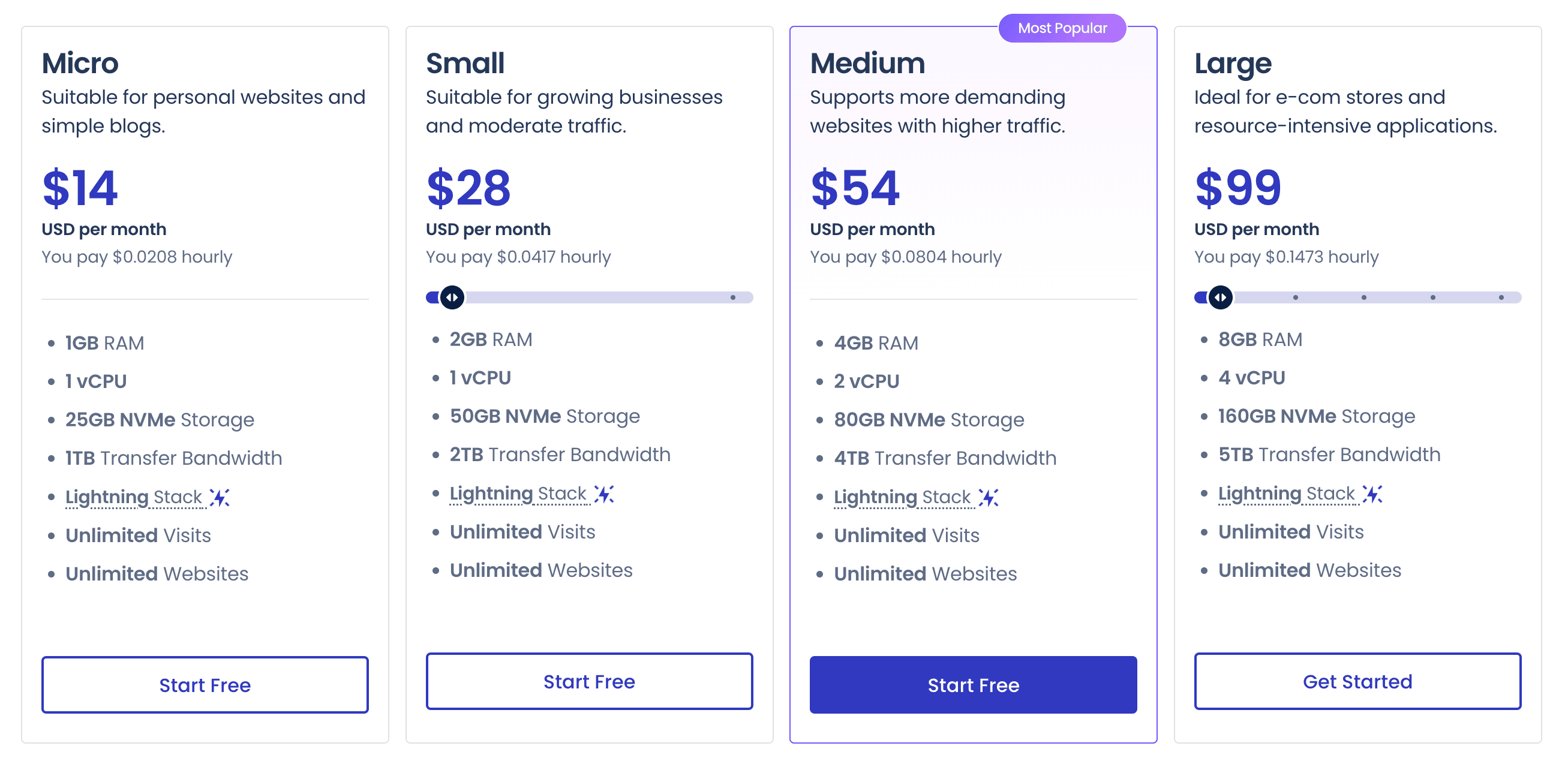
On the Cloudways pricing UI around November 2026, DigitalOcean Basic Flexible examples looked roughly like:
| Example size | About $/mo | Spec |
|---|---|---|
| Small / entry | ~$28 | ~2GB RAM class, 1 vCPU |
| Medium | ~$88 | ~8GB RAM class |
| Large example | ~$342 | large box—you’ll feel it |
Other clouds (Vultr, Linode, AWS, GCP) and “premium” DO flavors cost different amounts for similar RAM. Offsite backup storage was called out around $0.033/GB per server. Flexible still marketed a short trial without a credit card.
Treat those as ballpark anchors, not a contract. Check the live page.
Autonomous pricing (the messy part)
Autonomous is a separate WordPress autoscaling line. As a buyer, tier naming and what’s included don’t always read cleanly. We’ve seen visit-style Small/Medium/Large rows and Growth/Scale/Plus-style language around the same product family.
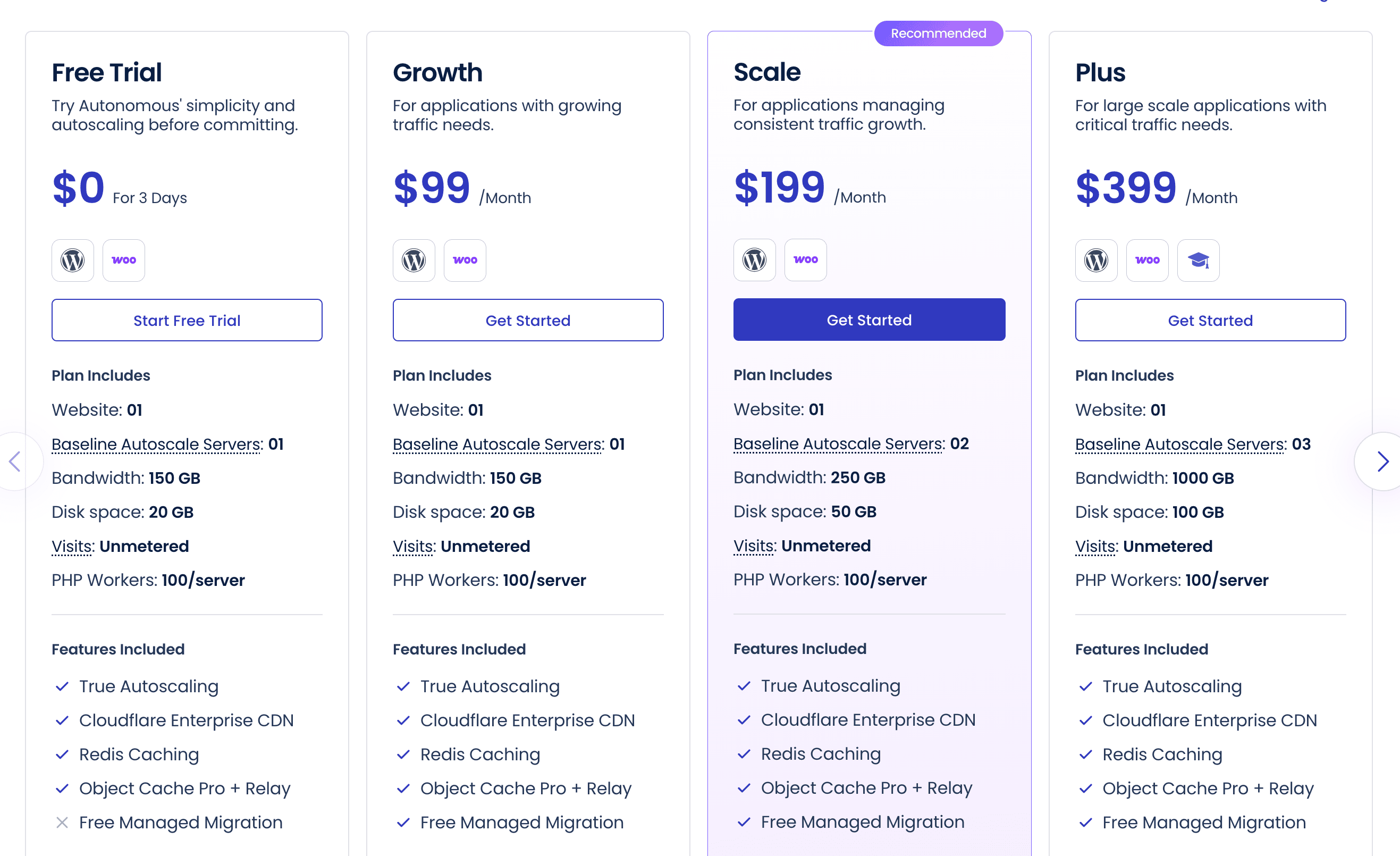
Screenshot what you see today and budget from that—especially if finance needs a predictable line item. Quiet nights can still produce “what did last night cost?” mornings.
What you’d actually pay (rough monthly math)
Same-week math as of November 2026—not a quote. Flexible sizes from the pricing UI notes above; premium WP and shared renew from deal/marketed plans (SiteGround deals, Kinsta entry ~$35 class).
| Job | Steady monthly class | What you’re paying for |
|---|---|---|
| Flexible DO small + mailbox | ~$28 + ~$6–12/user mail | Managed VM + apps; email separate |
| Flexible DO mid (~8GB) + mail | ~$88 + mail + backup GB | Multi-app / agency packing |
| Autonomous Growth | Live plan (about $99; older Small cards may still appear) | Autoscaling WordPress — not Kinsta Single |
| WP Engine Essential Startup | ~$28 first-year marketing class (25k visits / 10 GB) | Premium WP — confirm renew |
| Kinsta entry (1 site) | ~$35 steady (~$30 annual) | Premium WP polish, per-site plan price |
| SiteGround StartUp renew | $14.99-$24.99/mo by term after intro | Simple WP — not the same as Flexible |
How I’d read it: a tiny Flexible box plus Google Workspace–class mail often undercuts “premium WP + many quiet sites,” and still looks more expensive than shared intros on list price. Full plan-card math is Cloudways pricing. Autonomous only belongs on the shortlist after you trust the live tier names. Offsite backup at ~$0.033/GB is a real line item—don’t pretend the ~$28 list price is all-in.
Performance and scaling
Flexible is usually enough for steady traffic: you resize (or add servers) when the box is the bottleneck. Autonomous belongs on the shortlist for launches and flash sales—after you understand the live price plan—because you’re trading manual resize for billing that can move with load.
Performance on Flexible tracks the underlying cloud. AWS-class boxes usually cost more than entry DigitalOcean for a reason. When Amazon under the hood is required (Flexible-on-AWS vs custom managed AWS), start from managed AWS hosting. For Woo/WordPress, caching (Redis / Object Cache Pro–class options) matters more than the homepage brand. Confirm what’s included on your size.
What I actually watch, more than vanity speed charts: resize headroom, staging before risky deploys, and whether cache purge is part of your release routine.
Support, staging, and day-to-day workflow
Cloudways markets 24/7 chat/tickets. What I actually care about is time-to-human when something’s broken. Flexible still feels like a server plus apps (SSH, staging/cloning, multi-app). Autonomous feels more like a WordPress product.
On Flexible stacks I’ve run, I size the server, attach the apps, clone to staging before a plugin or theme risk, and purge cache when the front end looks stuck after a deploy. Agencies keep Flexible because you’re not locked into one WordPress install per expensive plan slot — packing many quiet sites is the job I cover in WordPress hosting for agencies. You’re still not getting full unmanaged root—and that’s fine if you paid for managed on purpose.
Security (honest scope): you’re buying a managed layer (patching and day-to-day scope the vendor markets, SSL, common WP hardening options)—not a compliance certificate farm. If you need named audits (SOC/HIPAA-style claims), read the live trust/docs pages.
Limitations worth knowing before you migrate
The deal-breakers are usually email, root, and whether finance can live with a bill that isn’t a forever-fixed plan. None of these are fine print you discover after DNS cuts over.
Email. Plan on a third-party mailbox. Don’t discover that mid-migration.
Root DIY. Flexible is managed. If you want full OS control, use Vultr/RackNerd.
Autonomous money anxiety. If finance needs a forever-fixed line item, Kinsta/WP Engine plans may feel safer even when the monthly is higher.
Autonomous is WordPress-centric. Flexible is where non-WP PHP still belongs.
Onto Cloudways (short checklist)
- Mailbox first if you’re leaving a host that bundled email.
- Lower DNS TTL; migrate into a Flexible (or Autonomous) staging URL; verify forms/checkout. Shared or managed WP → this stack is migrate WordPress to a VPS.
- SSL + cache after cutover; confirm backup/add-on line items match the invoice.
- Screenshot Autonomous pricing the day you buy if that’s the product line—tier labels have moved.
- First week — cron, staging checks, and that you’re not still paying the old host’s renew term by accident.
Cloudways vs Kinsta vs WP Engine vs SiteGround
What splits the shortlist is how you’re billed and how much WordPress polish you actually need—not which brand wins a generic “best host” table. Match the row to the job, then read the caveats under it.
| If you care about… | I’d pick… |
|---|---|
| Per-server $/many small sites, multi-cloud, PHP beyond WP | Cloudways Flexible |
| Premium WP polish, staging, edge/CDN-first packaging | Kinsta, WP Engine, or Rocket.net |
| Simpler onboarding, shared/cloud comfort, intro pricing | SiteGround—and read the renewal |
| Cheapest RAM, full root | Vultr / unmanaged VPS |
vs Kinsta / WP Engine / Rocket.net: They win when one or a few WordPress sites deserve premium managed WP and you’ll pay per-site economics. Kinsta Single ~$35/$30—see the Kinsta review. WP Engine Essential Startup often ~$28 first-year marketing—see the WP Engine review. Rocket.net Starter ~$30/$25. Each is higher than a tiny Flexible DO box but buying turnkey WP polish. Fine for flagships. Silly for fifteen brochure clients—Flexible exists for that case.
vs SiteGround: Different category on a lot of plans. Don’t compare a promo shared intro (~$2.99) to a Flexible cloud box. StartUp renew ~$17.99/mo on the 12-month term; Cloud Jump Start ~$100 is the fairer cloud match. Renewal math and the panel story sit in the SiteGround review.
vs raw VPS: Cloudways costs more than naked Vultr RAM because you’re buying the management layer. Same-week DO-direct vs Flexible premium sits on the first-term vs renewal table. Head-to-head with raw Vultr is Cloudways vs Vultr; Droplet vs Flexible-on-DO is Cloudways on DigitalOcean. If nobody will patch and maintain the OS, pay for managed. If someone will, maybe don’t.
Who should buy (and who shouldn’t)
Buy Flexible if you’re okay resizing a server, you like picking DO vs Vultr vs AWS, and you want managed without stacking per-site premium plans. Consider Autonomous only when WordPress spikes are the main problem and you’re willing to watch billing more than boxes—checkout-shaped shortlist is managed WooCommerce hosting.
Don’t buy Cloudways if you need bundled email, you want maximum root, or you only want the most hand-holding WordPress host—go Kinsta/WP Engine, or start from Cloudways alternatives when you’re deciding whether to stay or switch.
Verdict
I still shortlist Cloudways in 2026. For a lot of builder and agency workloads, Flexible is the practical middle between raw VPS chaos and premium WP pricing.
Autonomous stays situational. Useful idea. Pricing UX that makes me double-check—your spreadsheet should too.
Match the job, confirm live Cloudways pricing, and don’t treat unmanaged VPS as the same product.
FAQ
Is Cloudways good in 2026?
Yes if you want managed cloud without Kinsta/WP Engine per-site pricing. Re-check Autonomous pricing live before you buy.
Flexible or Autonomous?
Flexible for control and multi-app PHP. Autonomous when WordPress traffic spikes are the main fear—and you’re willing to watch the bill.
Does Cloudways include email hosting?
Usually no—plan on a third-party mailbox. Don’t discover that mid-migration.
How does Cloudways pricing work?
Flexible bills like a cloud server (size/provider). Autonomous is a separate WordPress autoscaling line—screenshot the live pricing page because tier labels have varied.
Related posts


Last updated